


Streaming should feel easy. You press play, sit back, and relax. But sometimes, that doesn’t happen. Instead, HBO Max suddenly shows error code 1300798, and the video refuses to load. That moment breaks the mood fast. This guide explains what this error means, why it appears, and how you can avoid seeing it again.
If you’re stuck and wondering what went wrong, you’re in the right place. Let’s slow it down and look at it clearly.
What Is HBO Max Error Code 1300798?
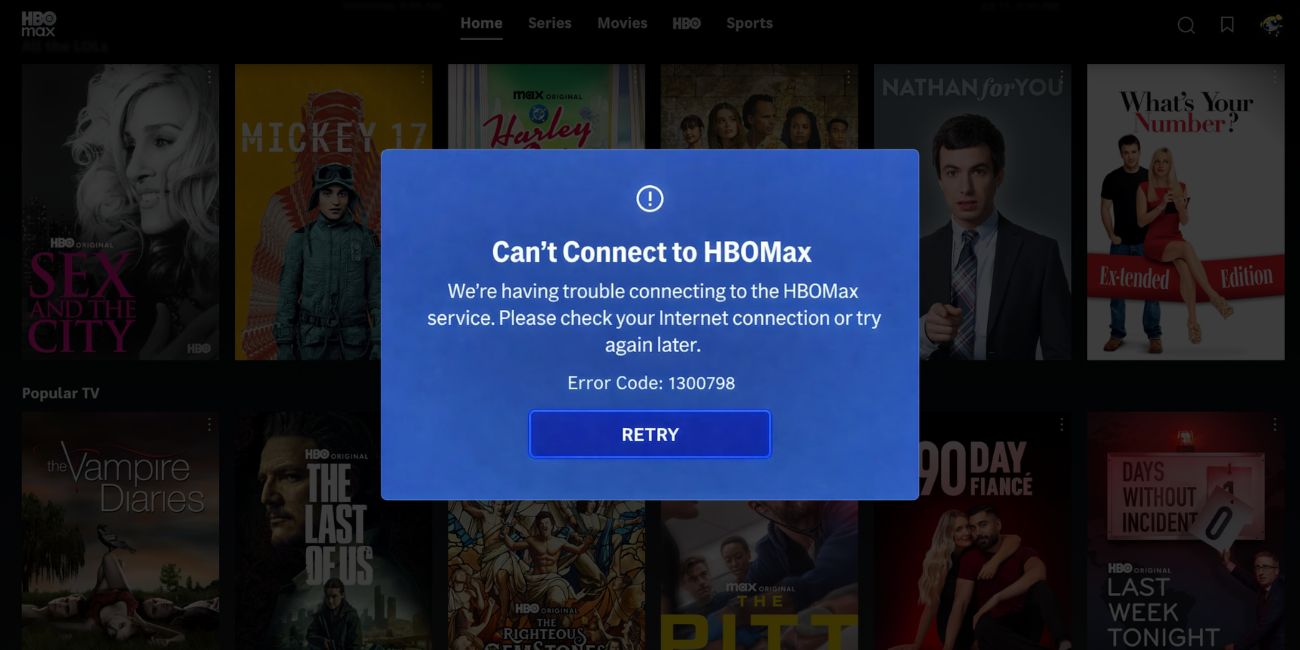

HBO Max error code 1300798 is a playback-related error. It shows up when the app or website fails to start or continue streaming a video. In simple terms, the HBO Max app cannot keep a stable connection with its streaming system. Because of this, the video never fully loads. Sometimes the app opens fine, menus work, and thumbnails show, yet playback stops at the last step. This often points to a connection check or stream request that didn’t complete properly. It does not mean your account is blocked, suspended, or limited.
You usually see this error right after pressing play. It can appear on Smart TVs, Android phones, iPhones, tablets, or web browsers on Windows and macOS. Some users notice it during loading screens, while others see it after a few seconds of buffering. The message looks the same across devices, even though the reason behind it may differ.
Common Causes of HBO Max Error Code 1300798
This error can happen for several reasons, depending on your device, network, or app behavior. Sometimes the issue sits on your side. Other times, it comes from outside your control. Knowing the common causes helps narrow things down faster and avoids random guessing.
Below are the most frequent reasons linked to this error.
- Unstable or slow Wi-Fi that cannot maintain video streaming
- Corrupted HBO Max app cache or temporary data files
- Outdated HBO Max app version missing recent fixes
- Active VPN or proxy blocking regional streaming access
- Temporary issues with HBO Max servers or content delivery networks
- Device operating system compatibility problems
- Internet service provider routing or DNS configuration issues
How to Fix HBO Max Error Code 1300798?
In most cases, this error does not come from one single problem. It usually appears because of a mix of network issues, app behavior, or device limits. Therefore, it’s important to go through the fixes step by step instead of jumping around.
Some fixes take seconds, while others need a few checks. Start from the top and move down until the issue stops.
Fix #1: Restart the HBO Max App
This error often shows up when the app session gets stuck in the background. When that happens, the app may fail to request the video stream correctly. Closing and reopening the app forces it to create a fresh connection with the streaming system.
Once the app restarts, it usually reloads account data and playback settings again. Many users see the error disappear at this point, especially on mobile devices and Smart TVs.
Fix #2: Check Your Internet Connection
A weak or unstable connection is one of the most common reasons behind this error. Streaming needs a steady flow of data, not just a connected network icon.
Here are the following steps which help you to check your internet connection:
- Disconnect your device from Wi-Fi
- Restart your router and modem
- Wait at least 30 seconds before turning them back on
- Reconnect your device to the network
- Try streaming again using HBO Max
- If possible, switch to a different Wi-Fi or mobile data
If the stream works on another network, the issue likely comes from your original connection.
Fix #3: Clear HBO Max App Cache and Data
Over time, the app stores temporary files to load content faster. Sometimes those files get corrupted. When that happens, playback errors appear even though everything else looks fine.
Follow the steps below to easily clear the HBO Max app cache:
- Open your device settings
- Go to Apps or Application Manager
- Select HBO Max from the list
- Tap Storage
- Clear cache first
- Clear data if the error continues
- Open HBO Max and sign in again
After this, the app starts clean, without broken temporary files.
Fix #4: Turn Off VPN or Proxy Services
Many users forget their VPN is still running in the background. HBO Max uses location-based streaming rules. When a VPN or proxy hides your real location, the app may block playback or fail during loading.
When the VPN is active, the app may reach the login stage but fail at video delivery. Turning it off allows HBO Max to verify your region correctly and connect to the nearest streaming servers. Once disabled, reopen the app and try again.
Fix #5: Update the HBO Max App
Older app versions may contain bugs that affect playback. HBO Max updates often include fixes for streaming errors and compatibility issues.
You can perform the following steps to update the HBO Max app:
- Open Google Play Store or Apple App Store
- Search for HBO Max
- Check if an update button appears
- Install the update
- Restart your device after updating
- Open the app and test playback
If the app was outdated, this fix alone can solve the issue.
Fix #6: Try a Different Device or Browser
Sometimes the problem is not your account or network. It’s the device itself. Older Smart TVs, unsupported browsers, or outdated systems may struggle with newer streaming requirements.
Try signing into HBO Max on another phone, tablet, or browser. If the video plays there, your original device likely has compatibility limits or system-level issues. This helps confirm where the problem actually sits.
Fix #7: Check HBO Max Server Status
Not all errors come from your side. Sometimes HBO Max servers face outages, maintenance, or traffic overload. When that happens, many users see the same error at the same time.
If servers are down, no local fix will work. Waiting is the only option. Once the service restores normal operation, playback usually resumes without any changes on your device.
Fix #8: Restart Your Streaming Device
Devices that run for long periods without rest may build up memory conflicts. These conflicts can interrupt streaming apps during playback.
Here’s how you can restart your streaming device in just a few seconds:
- Turn off the device completely
- Unplug it from the power source
- Wait for 30 to 60 seconds
- Plug it back in
- Turn the device on
- Open HBO Max and try again
This clears background processes and refreshes the system environment.
Prevention Tips to Avoid HBO Max Error Code 1300798 in the Future
Prevention matters because repeated streaming errors waste time and patience. Small habits can reduce the chance of playback failures and keep HBO Max running smoothly. Most of these steps don’t take much effort, yet they help maintain a stable streaming setup over time.
- Keep the HBO Max app updated on all devices
- Use a steady internet connection instead of switching networks often
- Avoid VPNs or proxy services while streaming region-locked content
- Restart your Wi-Fi router once a week to refresh the connection
- Keep your device operating system up to date
- Use supported devices and modern web browsers
- Watch network performance during peak usage hours
These steps won’t stop every issue, but they lower the risk of seeing the same error again.
Conclusion
To summarize, HBO Max error code 1300798 is a playback error linked to connection checks between your device and HBO Max streaming servers. It often appears due to network instability, app data problems, outdated software, VPN interference, or temporary server issues. The error looks serious, but in most cases, it’s not permanent or account-related.
If you keep running into this problem, staying consistent with prevention habits helps a lot. And when the error doesn’t go away, reaching out to HBO Max support is the right move.
If this guide helped you understand the issue, consider sharing it with others who stream on HBO Max. You can also leave a comment below and tell us where you saw the error.