


Quick Answer: You can cancel Fubo from the same place where you signed up. If you subscribed on the Fubo website, cancel from your Fubo account. If you signed up through Roku, Apple or Google Play, cancel from that billing account instead.
Canceling Fubo should be easy, but it can get confusing fast. You open the Fubo app, click around, check account settings and still cannot find the cancel option. Not a good mood.
The main thing is this. Fubo cancellation depends on where your billing started. If you signed up on the Fubo website, you cancel on Fubo. If you subscribed through Roku, Apple, Google Play or another partner, you cancel there. Deleting the Fubo app does not cancel the subscription.
This guide explains how to cancel Fubo on the website, Roku, iPhone, Android and Google Play. It also explains what happens after canceling, why you may still have access, why you may still get charged and how to confirm it is really canceled.
Before You Cancel Fubo, Check Where You Signed Up
Before canceling anything, check where your Fubo subscription is billed from. This is the step many people skip, and then they keep looking in the wrong place. If Apple is billing you, Fubo may not show the same cancel button. If Roku is billing you, the Fubo website may not be the correct place either.
The usual billing places are:
- Fubo website
- Roku account
- Apple ID or App Store
- Google Play
- Another partner account or device billing
A simple way is to check your email receipt. Search for Fubo, Roku, Apple, Google Play, or subscription in your inbox. The receipt normally tells you who charged you. If you see Roku on the receipt, go to Roku. If you see Apple, go to Apple. Same idea.
How to Cancel Fubo on the Website 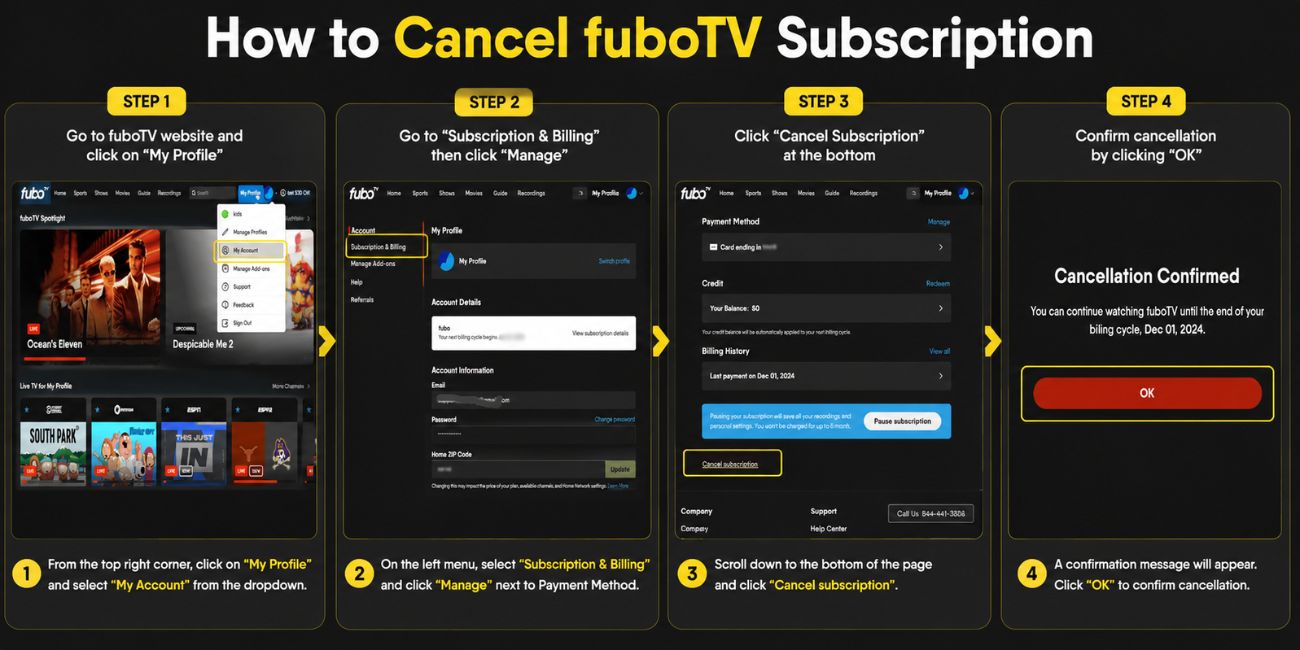

If you signed up directly from the Fubo website, cancellation should be done from your Fubo account. Go to the Fubo website, sign in, then open your account area. Look for the subscription or billing section. The cancel option is usually there.
This is where you need to be careful. Clicking the first cancel button may not be the final step. Fubo can show an offer, pause option or another confirmation screen before the subscription is fully canceled. So keep going until you see a final confirmation message.
Steps are simple:
- Go to the Fubo website
- Sign in to your account
- Open My Account
- Go to Subscription or billing area
- Select Cancel or Cancel Subscription
- Continue past any offer if you still want to cancel
- Save the confirmation
Take a screenshot or keep the cancellation email. Small thing, but if you get charged later, this proof helps.
How to Cancel Fubo on Roku
If Roku is billing your Fubo subscription, cancel it through Roku. Do not keep searching only inside the Fubo app, because the subscription is managed by Roku in that case.
You can cancel from the Roku website or from your Roku device. Both ways do the same job. Use whichever one is easier for you.
Cancel Fubo on Roku Website
Go to your Roku account subscriptions page and sign in with the Roku account that is being charged. Find Fubo under active subscriptions, then choose the manage or unsubscribe option.
Follow this:
- Go to your Roku subscriptions page
- Sign in to your Roku account
- Find Fubo under active subscriptions
- Choose Manage subscription or Unsubscribe
- Confirm the cancellation
- Save the confirmation
If Fubo is not showing there, you may be signed in to the wrong Roku account. That happens. Check another email if you have more than one.
Cancel Fubo on the Roku Device
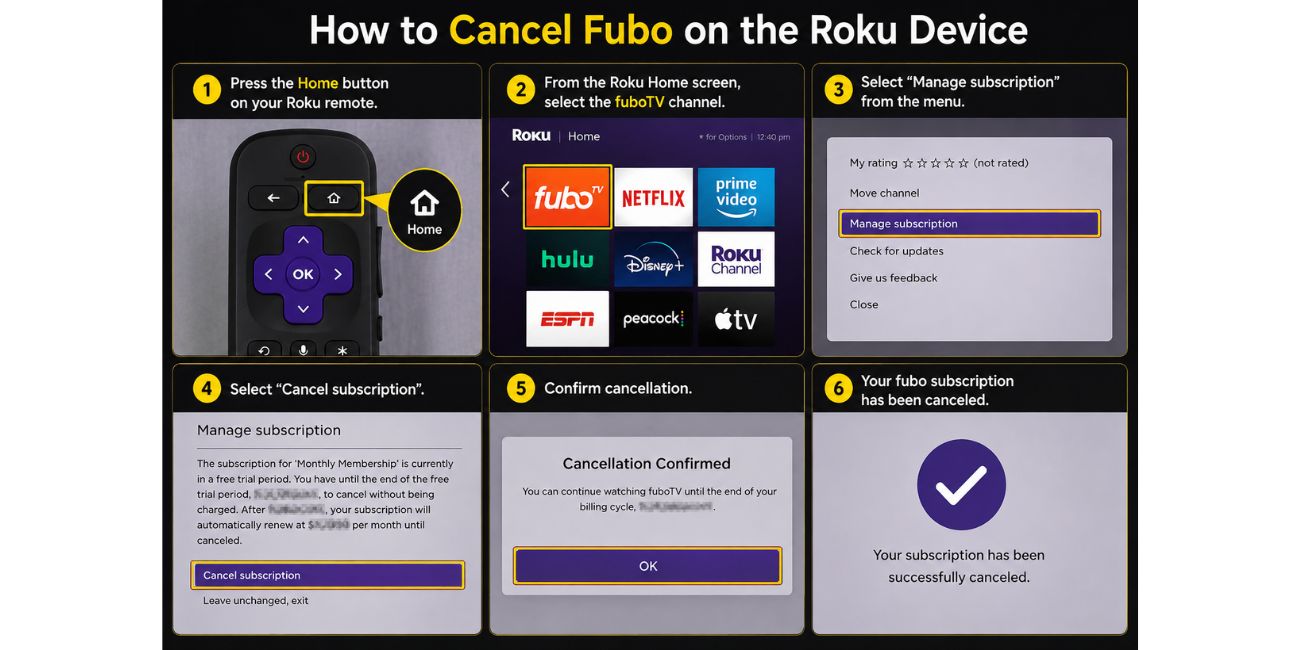
You can also cancel from the Roku device. Press the Home button on your Roku remote and open the Fubo app. Press the Star button “*” on the remote and open the subscription menu.
Choose Manage subscription, then cancel or turn off auto-renewal. Confirm the change. Roku may still let you watch until the current billing period ends, so do not panic if the app still opens after canceling.
How to Cancel Fubo on iPhone or Apple ID
If Apple is billing you for Fubo, you need to cancel it from your Apple ID subscriptions. Not only from the Fubo app. This is the part people miss.
Open Settings on your iPhone, tap your name at the top, then tap Subscriptions. Find Fubo, open it and tap Cancel Subscription. If there is no cancel button and it already shows an expiration date, it may already be canceled.
Use these steps:
- Open Settings
- Tap your name
- Tap Subscriptions
- Select Fubo
- Tap Cancel Subscription
- Confirm it
If you do not see Fubo there, check another Apple ID. Maybe you subscribed with a different Apple account. Apple receipts in your email can also help.
How to Cancel Fubo on Android or Google Play
If you subscribed through Google Play, cancel Fubo from Google Play subscriptions. Do not just uninstall the app. Uninstalling removes the app from your phone, but it does not stop billing. This one is important.
Open Google Play, tap your profile icon and go to Payments and subscriptions. Open Subscriptions, choose Fubo, then tap Cancel subscription. Follow the screen until the cancellation is finished.
Steps:
- Open Google Play
- Tap your profile icon
- Go to Payments and subscriptions
- Tap Subscriptions
- Select Fubo
- Tap Cancel subscription
- Follow the instructions
If Fubo is missing, switch Google accounts and check again. Many Android users have more than one Google account on the same phone.
How to Cancel Fubo Free Trial
You cancel a Fubo free trial the same way you cancel a paid plan. The billing source still matters. If the trial started on Fubo, cancel from Fubo. If it started through Roku, Apple or Google Play, cancel there.
Do not wait until the last minute. If the trial ends today or tomorrow, cancel early if you do not want to be charged. Billing systems do not care that you “meant to cancel.” They charge when the trial changes into a paid plan.
Also remember, some trials may end as soon as you cancel. So if you still want to watch during the trial, check the message on the cancel screen before confirming. Read that part slowly.
What Happens After You Cancel Fubo?
After canceling Fubo, you may still have access until the end of your current billing period. This is normal. It does not always mean cancellation failed.
For example, if you already paid for the month, Fubo or the billing provider may let you keep watching until that month ends. The important thing is that auto-renew is turned off.
So if the app still works, check the subscription status instead of worrying right away. Look for words like canceled, expires on, or auto-renew off.
Why You Still Have Access After Canceling Fubo
You still have access because your paid time may not be over yet. That is common with streaming services. You cancel the next renewal, not always the current access.
This is different from some free trials. A free trial can sometimes stop right away after cancellation. A paid plan often continues until the paid period is finished.
So the main question is not “Can I still watch?” The real question is “Will it renew again?” Check that part.
Why Fubo Still Charged You After Canceling
If Fubo charged you after you thought you canceled, there are a few possible reasons. Maybe you canceled after the renewal date. Maybe you did not finish the final confirmation. Or maybe you canceled on Fubo, but Roku, Apple or Google Play was the real billing provider.
Common reasons include:
- You canceled after the next billing date
- You did not finish the final cancellation screen
- You canceled the wrong account
- Roku, Apple or Google Play is still billing you
- You have another Fubo account under another email
- The charge was already pending before cancellation
Check the receipt first. It usually tells you who billed you. That tells you where to fix the problem.
What to Do If You Cannot Find the Cancel Button
If you cannot find the cancel button, do not keep clicking random settings forever. It usually means your subscription is being managed somewhere else.
Check your email receipts and your app store subscriptions. Also check Roku if you ever signed up from a Roku device. Sometimes the cancel option is not missing. You are just in the wrong account.
Places to check:
- Fubo account billing page
- Roku subscriptions
- Apple ID subscriptions
- Google Play subscriptions
- Another email address you may have used
This part is boring, but it works. The receipt is often the fastest clue.
How to Confirm Your Fubo Subscription Is Canceled
Do not assume cancellation is done until you see proof. Some services show two or three screens before the final confirmation, and it is easy to stop too early.
Check these:
- Cancellation confirmation email
- Fubo subscription status
- Roku, Apple or Google Play subscription page
- Next billing date
- Auto-renew status
- Screenshot of the cancellation page
- Bank statement near the old billing date
If you see a renew or resubscribe option, that is usually a good sign. It means the active renewal was turned off.
Can You Pause Fubo Instead of Canceling?
Fubo may show options like pausing the account, changing the plan or accepting an offer before you cancel. This can depend on your account and how you are billed.
If you are canceling only because the bill is high, check your plan and add-ons first. Maybe removing an add-on is enough. Maybe not. But if your goal is to stop billing fully, make sure the final status says canceled or auto-renew is off.
Do not accept an offer by mistake if you really want to cancel. These screens can feel a little tricky, even when they are normal.
Does Fubo Give Refunds After Canceling?
Refunds are not something you should depend on. They can depend on who billed you and what the account situation is. Fubo, Roku, Apple and Google Play may all handle refund requests differently.
If Apple billed you, request the refund through Apple. If Google Play billed you, use Google Play refund options. If Roku billed you, check with Roku. If Fubo billed you directly, contact Fubo support.
The safer move is to cancel before the renewal date. Refunds are stressful. Avoid needing one if you can.
Tips Before Canceling Fubo
Before you cancel, take one minute and check the details. It can save you from a second charge later.
Useful tips:
- Cancel at least a day before renewal
- Check where you signed up
- Save the confirmation email
- Take a screenshot after cancellation
- Remove add-ons if you only want to lower the bill
- Check if you have more than one account
- Do not rely on deleting the app
Deleting the app only removes it from your device. It does not cancel the subscription. This is the point people forget.
FAQs About Canceling Fubo
Can I cancel Fubo anytime?
Yes, you can usually cancel Fubo anytime. If you are on a paid plan, you may still have access until the current billing period ends.
Does deleting the Fubo app cancel my subscription?
No, deleting the Fubo app does not cancel your subscription. You need to cancel from Fubo, Roku, Apple, Google Play or wherever you signed up.
Why can’t I cancel Fubo from the app?
Your subscription may be managed by another billing provider. Check Roku, Apple ID, Google Play or your email receipt.
Will I lose access immediately after canceling Fubo?
Not always. Paid plans often continue until the end of the billing period. A free trial may end immediately after cancellation.
How do I know if Fubo is really canceled?
Check the confirmation email, subscription status, renewal date and the billing account where you signed up. Take a screenshot if possible.
Final Thoughts
Canceling Fubo is not difficult once you know where you subscribed. If you signed up on the Fubo website, cancel from your Fubo account. If Roku, Apple or Google Play billed you, cancel from that account.
The important thing is simple. Do not just delete the app and think it is done. Finish the cancellation, check the confirmation and save proof.
Did you sign up for Fubo through the website, Roku, Apple or Google Play? Comment where you subscribed, because the cancel steps can be different.