


You open ChatGPT, click the model selector, and expect to see ChatGPT-5. But it’s not there. That moment can feel confusing, especially after reading news about new AI models or OpenAI updates.
This guide explains the issue in simple terms. You’ll learn what the ChatGPT-5 not showing up problem means, why it happens in the OpenAI ChatGPT platform, and how to fix it. The article also shows ways to prevent model visibility issues in the future so your ChatGPT account, browser, or mobile app works smoothly.
What Is the “ChatGPT 5 Not Showing Up” Issue?
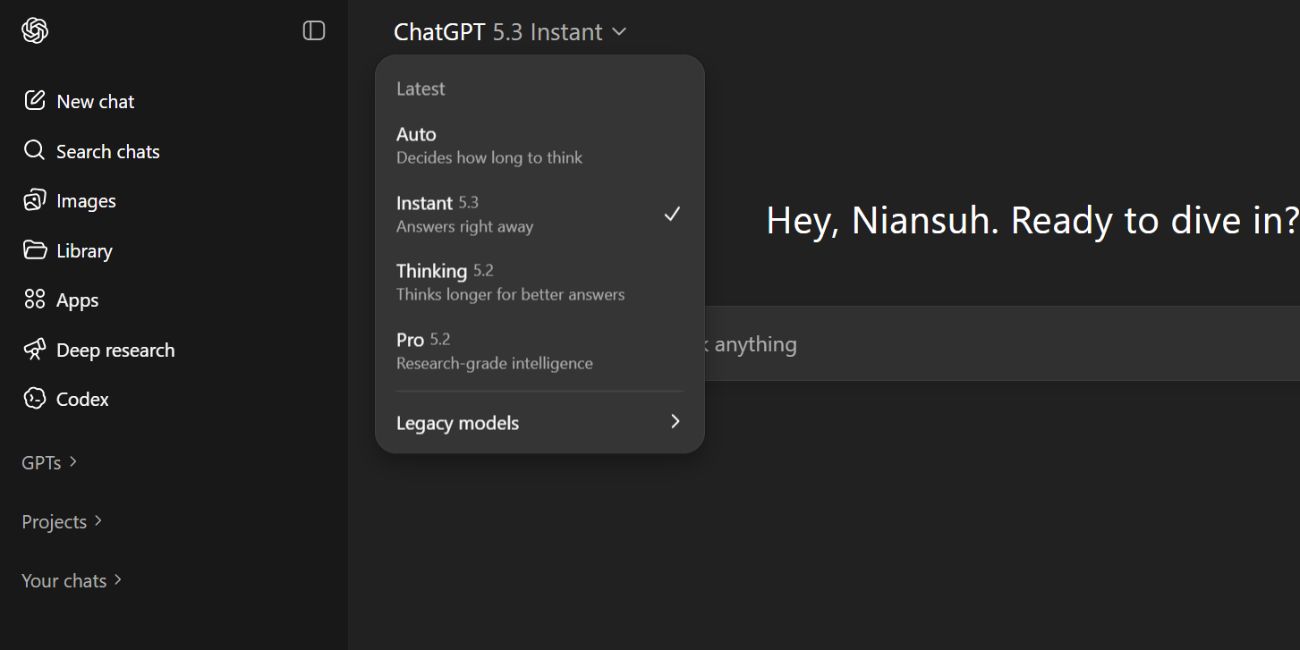

When users open ChatGPT, they usually see a model menu that lists available OpenAI language models. Examples include GPT-4, GPT-4o, and other versions used inside the ChatGPT interface. The system works like a control panel. It lets users select a model that processes prompts using a large language model system trained by OpenAI.
Sometimes people expect GPT-5 to appear in that list. But the system only shows models that OpenAI has released and enabled for that account. If GPT-5 does not appear, the platform is simply displaying the models currently allowed for that user. This situation connects to OpenAI rollout policies, subscription levels such as ChatGPT Free or ChatGPT Plus, and regional availability on the OpenAI cloud infrastructure.
Common Causes of ChatGPT-5 Not Showing Up
This issue can happen for several reasons connected to the OpenAI platform, the ChatGPT interface, and AI model release schedules. Many users expect GPT-5 after reading social media discussions or technology news, yet the platform only shows officially available models. Other times, access depends on subscription settings, device software, or regional rollout timing.
Common causes include:
- GPT-5 has not been officially released by OpenAI yet
- The AI model is in a staged rollout or internal testing phase
- The user account runs on the ChatGPT Free plan, not ChatGPT Plus
- The ChatGPT mobile app or browser version is outdated
- Account feature flags for new models are not enabled yet
- The rollout has not reached the user’s geographic region
- Confusion between rumored models and existing models like GPT-4o
Each cause connects to OpenAI infrastructure, the ChatGPT product ecosystem, and the company’s normal release process for large language models.
How to Fix ChatGPT-5 Not Showing Up?
The solution depends on what caused the issue. Sometimes nothing is wrong with your device or account. The model simply isn’t available yet. Still, checking a few settings can help confirm whether ChatGPT should display the model.
Below are practical fixes users often try when the ChatGPT model selector does not show the expected AI version.
Fix #1: Check If GPT-5 Is Officially Released
Before changing any settings, confirm whether OpenAI has released GPT-5. Technology blogs, AI communities, and social media sometimes discuss future models long before official announcements.
Visit the OpenAI website, the OpenAI blog, or the ChatGPT help center. If GPT-5 has not launched publicly, it will not appear in the ChatGPT interface regardless of device or subscription.
Fix #2: Refresh the ChatGPT Session
Sometimes the browser session fails to load updated model options from the OpenAI servers.
Try these simple steps to refresh the session:
- Open the ChatGPT website in your browser.
- Log out of your OpenAI account.
- Close the browser tab.
- Open ChatGPT again.
- Log back in and check the model selector.
After logging in again, the interface often reloads the available models.
Fix #3: Update the ChatGPT Mobile App
Older versions of the ChatGPT mobile application may not display new models released by OpenAI.
Follow the steps below to update the app:
- Open the Apple App Store or Google Play Store.
- Search for ChatGPT by OpenAI.
- Tap the Update button if available.
- Wait for the installation to finish.
- Restart the app and check the model menu.
Once updated, the app connects to the newest OpenAI service version.
Fix #4: Check Your ChatGPT Subscription Plan
Access to some AI models depends on subscription levels. The ChatGPT Free plan may provide limited model choices.
Users with ChatGPT Plus or ChatGPT Pro sometimes receive earlier access to advanced models. If your account uses the free plan, the platform may only show standard versions like GPT-4o.
Fix #5: Clear Browser Cache
Web browsers store cached files to load websites faster. But outdated cache data can prevent the ChatGPT interface from updating.
Follow these steps to clear browser cache:
- Open browser settings.
- Go to Privacy and Security.
- Select Clear browsing data.
- Choose Cached images and files.
- Confirm the action.
- Restart the browser and reopen ChatGPT.
Clearing cache helps the browser load the newest interface files from OpenAI servers.
Fix #6: Use a Supported Browser
Modern web technologies power the ChatGPT interface. Old browsers may not support them fully.
Use browsers such as:
- Google Chrome
- Microsoft Edge
- Apple Safari
- Mozilla Firefox
Updated browsers connect better with the OpenAI cloud platform and reduce compatibility issues.
Fix #7: Check Regional Availability
OpenAI sometimes releases new models in stages across different regions. This process helps manage server load and monitor performance.
If the rollout has not reached your country yet, the ChatGPT model selector will not show the model. Waiting for the rollout often resolves the issue automatically.
Fix #8: Wait for the Official Rollout
In some cases, patience is the only step needed. OpenAI deploys new language models through cloud infrastructure and feature flags.
Once the rollout reaches your account, the new model appears automatically in the ChatGPT interface.
Prevention Tips to Avoid ChatGPT Model Access Issues
Preventing access issues saves time and avoids confusion when OpenAI releases new models. Many problems appear because users run outdated software or rely on unofficial news about AI releases.
Helpful habits include:
- Keep your ChatGPT mobile app updated
- Use modern browsers like Chrome or Edge
- Clear browser cache occasionally
- Follow official OpenAI announcements instead of rumors
- Check the OpenAI blog when new AI models launch
- Refresh your ChatGPT session after major updates
- Upgrade to ChatGPT Plus if you want faster access to new features
These small steps keep the ChatGPT interface, OpenAI cloud services, and your user account working smoothly.
Conclusion
In short, the ChatGPT-5 not showing up issue usually relates to model availability. OpenAI may still be developing the model, rolling it out gradually, or restricting access based on subscription or region. The ChatGPT interface simply displays the models currently enabled for your account.
If the model still does not appear after trying the fixes, check the OpenAI Help Center or official announcements for the latest updates. OpenAI support can confirm whether the model is available for your account.
Have you experienced this issue yourself? Share your experience in the comments. Your feedback may help other users understand what worked and what did not. And if this guide helped you, consider sharing it with others who use ChatGPT and OpenAI tools.