

No, most NZXT Kraken X coolers do not have a GIF option.
If you have a Kraken X53, X63, X73 or the Kraken X RGB version, you normally cannot upload a GIF to the pump head. The reason is simple. Kraken X is not an LCD screen cooler. It uses NZXT’s RGB infinity mirror design instead. That looks nice inside a PC build but it is not a small display screen where you can show images or GIFs.
This is where many people get confused. They open NZXT CAM, look for a GIF upload button and it is not there. In most cases, nothing is broken. The cooler just does not support that feature.
Why Kraken X Does Not Show the GIF Option
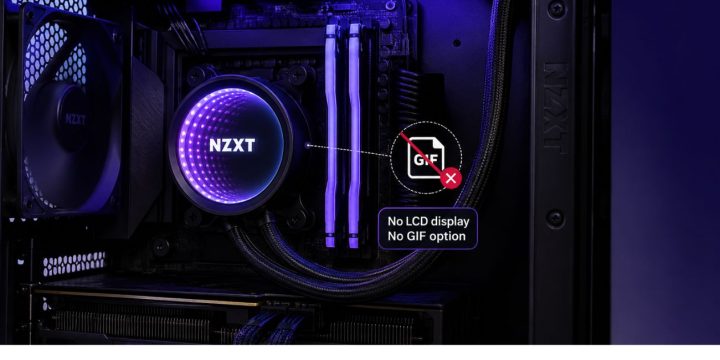
The Kraken X series was made more around RGB lighting and the infinity mirror look. You can change lighting effects, control the pump and adjust some performance settings through NZXT CAM, but that is different from showing a custom animation on a screen.
A GIF needs an actual display. Kraken X does not have that kind of display on the pump cap. It has lighting. So CAM will not show the same display options that you see on Kraken Z, Kraken Elite or Kraken Plus.
Think of it like this. If your cooler has lights, CAM can control lights. If your cooler has a screen, CAM can control screen content. Kraken X falls into the first group.
Kraken X vs Kraken Coolers That Support GIFs
Some Kraken models do support GIFs, but they are not the same as Kraken X. The models with LCD screens are the ones you should look at if GIF support is important to you.
| Kraken Model | Display Type | GIF Option |
|---|---|---|
| Kraken X53 / X63 / X73 | RGB infinity mirror | No GIF display |
| Kraken X RGB | RGB infinity mirror with RGB fans | No GIF display |
| Kraken Z series | LCD screen | Yes, supports custom image or GIF |
| Kraken Elite | LCD screen | Yes, supports image or animated GIF |
| Kraken Plus | Smaller LCD screen | Yes, supports image or GIF |
| Kraken Core | Illuminated logo / RGB style | No normal GIF display |
NZXT describes the Kraken Z series as having a 2.36 inch LCD screen that can show system data and animated GIFs, while the Kraken X-3 series is described around the RGB infinity mirror design. So the difference is hardware, not only software.
Newer Kraken Elite models also list a 2.72 inch IPS LCD and mention showing a favorite GIF or image on the display. Kraken Plus has a smaller 1.54 inch LCD and NZXT’s support page also lists Image/GIF as one of its display modes.
Why NZXT CAM May Not Show GIF Upload
If you are using a Kraken X cooler and NZXT CAM does not show the GIF upload option, that is expected. CAM only shows features that match the hardware it detects.
So if CAM sees a Kraken X, you may get lighting and cooling controls. You will not get the same LCD screen settings because the cooler does not have an LCD screen.
There can be other CAM problems too, like the cooler not being detected, an old CAM version, or a loose USB cable. But if everything else works and only the GIF option is missing, the most likely reason is your cooler model.
You can still check these basic things:
- Make sure NZXT CAM is updated
- Check that the cooler is detected in CAM
- Check the internal USB cable connection
- Restart the PC and open CAM again
- Confirm the exact Kraken model name
That last one matters a lot. Some people say “Kraken” and assume all Kraken coolers have the same features. They do not.
What You Can Customize on Kraken X
Kraken X does not support GIFs, but it is not fully locked down. You can still customize the look of the cooler through RGB settings.
Depending on your exact model and setup, you may be able to change lighting effects, colors and the infinity mirror style in NZXT CAM. Some Kraken X models also have a rotatable cap so the NZXT logo can face the right way in your build. NZXT’s Kraken X RGB manual also mentions the rotatable upper cap for logo orientation.
You can also use CAM for cooler-related settings, like pump or fan behavior if your setup supports it. This is more about performance than looks, but it still matters. AIO coolers are not only for style. They are also there to keep the CPU temperature under control.
So with Kraken X, think RGB customization. Not screen customization.
What If You Really Want a GIF on Your Cooler?
If your main goal is to show GIFs on the cooler, then Kraken X is not the right model for that. You need a Kraken model with an LCD display.
Kraken Z was the older popular option for this. Kraken Elite and Kraken Plus are newer options depending on your budget and what size screen you want. Kraken Elite gives you a bigger LCD and more display style. Kraken Plus gives you a smaller screen but still supports image and GIF display modes.
One thing to remember. Even on Kraken Elite, this does not mean you can upload any normal video file directly to the pump screen. NZXT’s support page says Kraken Elite supports static images or animated GIFs, not direct video file playback to the pump screen.
So if you want a funny animation, a logo GIF, an anime loop, or a small reaction image on your cooler, get an LCD-based Kraken. If you only want RGB lighting and a clean mirror look, Kraken X is fine.
Final Thoughts
The Kraken X cooler does not usually have a GIF option because it does not have an LCD screen. It has an RGB infinity mirror pump design. That is why NZXT CAM does not show the GIF upload option for Kraken X models like X53, X63 and X73.
If you want GIFs on your cooler, look at Kraken Z, Kraken Elite or Kraken Plus instead. If you already own a Kraken X, you can still customize RGB lighting and some cooling settings, but you cannot turn the pump cap into a GIF screen.
Which Kraken model do you have, X53, X63, X73 or another one?

