

Using spoiler tags on Discord helps you hide messages that may ruin surprises for others. This is common in gaming chats, movie discussions, or anime servers where people want to avoid spoilers.
The idea is simple. You send a message, but it stays hidden or blurred until someone clicks on it. This keeps conversations safe and respectful, especially in active communities.
What Are Spoiler Tags on Discord?
Spoiler tags are a formatting feature in Discord that hides text or media behind a clickable overlay. When someone sends a spoiler message, others will see a grey box instead of the content.
To read the message, the user has to click or tap it. This gives them control over what they want to see. It’s a small feature, but it plays a big role in chat etiquette.
How to Use Spoiler Tags on Discord Text
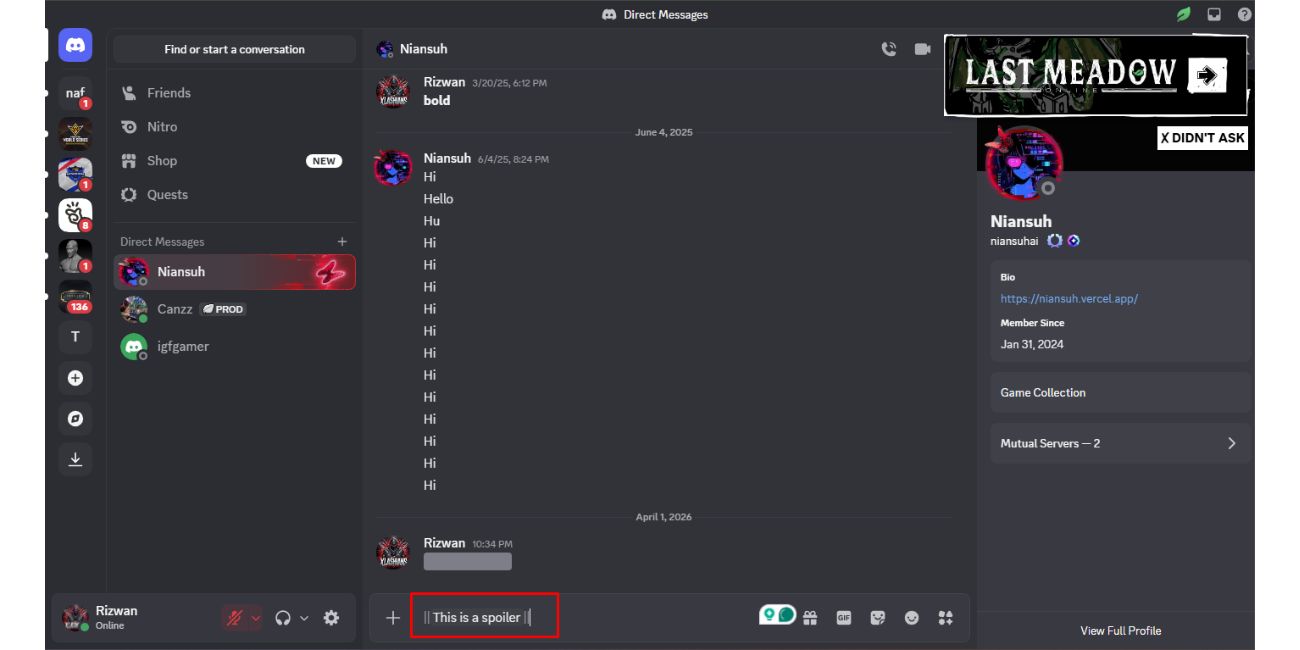
The most common way to hide text on Discord is by using simple markdown formatting. Just add two vertical bars before and after your message, and Discord will automatically turn it into a spoiler. Follow these steps:
- Type your message
- Add
||at the beginning - Add
||at the end - Send the message
Example:
||This is a spoiler||
Once sent, the message will appear hidden, and users will need to click it to reveal the text.
Make sure there are no spaces between the bars and the text. Even a small spacing mistake can break the formatting.
How to Mark Images or Videos as Spoilers on Discord
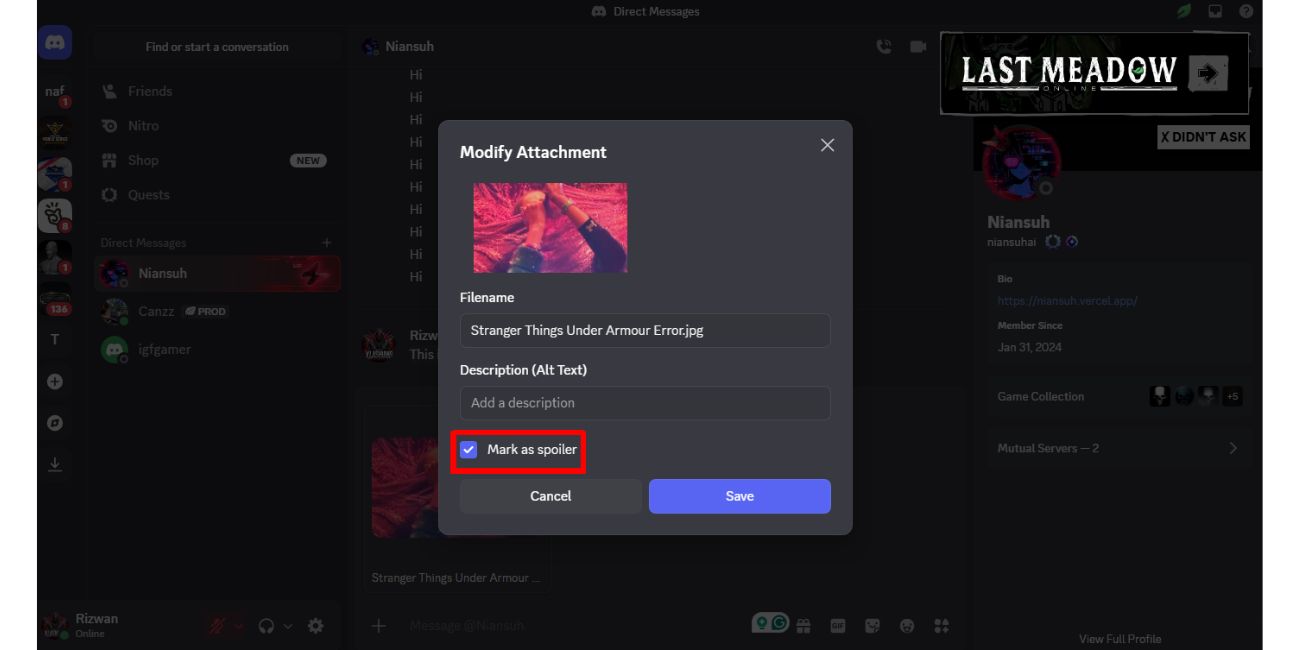
You can also hide images or videos when uploading them to Discord. This is useful when sharing screenshots, clips, or story-related content.
When you upload a file, Discord gives you an option to mark it as a spoiler before sending.
Here’s how to do it:
- Upload your image or video
- Look for the “Mark as spoiler” option
- Enable the toggle
- Send the file
Once sent, the media will appear blurred. Other users must click to view it.
How to Use Spoiler Tags on Discord Mobile
On mobile, the process is almost the same. Discord uses the same formatting rules across devices.
You can type spoiler tags manually using the same ||text|| method. There is no major difference in syntax between desktop and mobile.
Steps to follow:
- Open Discord app
- Type your message
- Add
||before and after the text - Send the message
For images, you can long-press the file before sending and select the spoiler option if available.
Why Spoiler Tags Are Not Working on Discord
Sometimes spoiler tags don’t work as expected. This usually happens because of small mistakes or app issues.
Here are common reasons:
- Missing
||symbols - Extra spaces inside the spoiler format
- Outdated Discord app
- Copy-paste formatting errors
- Using unsupported message format
If your message is not hidden, check your formatting first. Most issues come from incorrect typing.
When Should You Use Spoiler Tags on Discord?
Spoiler tags are not just a feature, they are part of good communication on Discord.
You should use them when sharing story content, game endings, plot twists, or anything that others may not have seen yet. It shows respect for other users in the server.
Different Discord communities also have rules about spoilers. Some require you to always use spoiler tags in certain channels.
Quick Tips to Use Spoiler Tags Faster
Here are a few simple tips that make using spoiler tags easier:
- Always double-check your
||symbols - Avoid adding spaces inside the tags
- Use copy-paste carefully
- Keep your Discord app updated
- Test your message before sending important content
These small habits help you avoid mistakes.
Final Thoughts
Spoiler tags on Discord are simple to use but very useful. They help keep conversations clean and enjoyable for everyone.
Once you understand the format, it becomes automatic. Just type, wrap your message, and send.
Did you try spoiler tags before, or was this your first time? Share your experience and help others learn faster.

