

You click Play in Steam. ARC Raiders starts loading. Then boom. Error Code 30005 shows up and the game closes. Annoying, right? When this happens, the game never reaches the main menu. Easy Anti-Cheat blocks the launch because something in Windows 10 or Windows 11 does not pass security checks. It feels like the game is broken, but most of the time it is a small system issue.
Don’t worry. This guide explains what ARC Raiders Error Code 30005 means, why it appears, how to fix it step by step, and what you can do to stop it from happening again.
What Is ARC Raiders Error Code 30005?
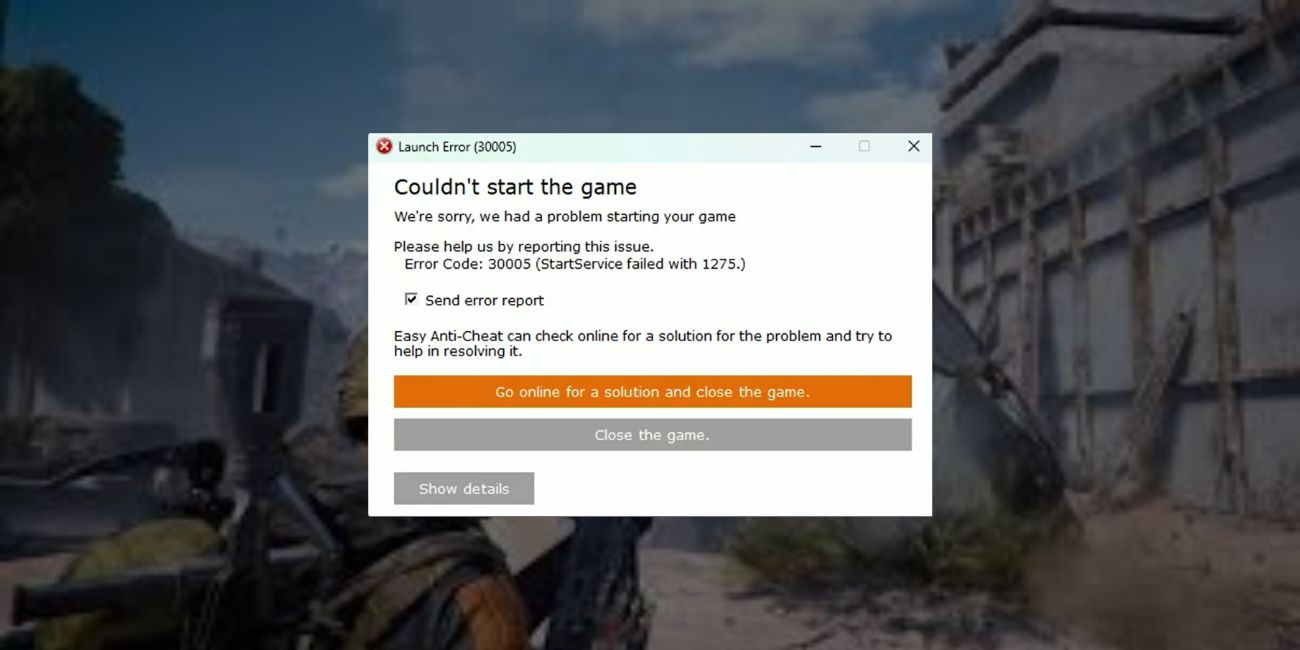
ARC Raiders Error Code 30005 is a startup error linked to Easy Anti-Cheat, also called EAC. Embark Studios uses Easy Anti-Cheat to protect the game from tampering and unfair software. When Windows cannot load the EAC service correctly, the security check fails. Because ARC Raiders depends on that check, the game stops before launching. This error usually points to corrupted anti-cheat files, blocked permissions, or missing system components like Microsoft Visual C++ Redistributable. It does not normally mean your GPU or hardware is damaged.
You will usually see this error after launching ARC Raiders from Steam Library or Epic Games Launcher. A small error window appears before the loading screen, and then the game closes.
Common Causes of ARC Raiders Error Code 30005
This error can show up for different reasons. Sometimes the issue sits inside Easy Anti-Cheat. Other times Windows Defender, firewall rules, or outdated NVIDIA and AMD drivers interfere with the launch process. Because ARC Raiders checks system integrity during startup, even a small file conflict can trigger Error 30005.
Here are the most common causes:
- Corrupted Easy Anti-Cheat installation files
- Missing Microsoft Visual C++ runtime packages
- Windows Defender or third-party antivirus blocking EAC
- Outdated NVIDIA GeForce or AMD Radeon graphics drivers
- Firewall blocking Steam network authentication
- Active VPN or proxy interfering with anti-cheat validation
- Damaged or incomplete ARC Raiders game files
How to Fix ARC Raiders Error Code 30005?
To fix this problem, you need to check your game files and your system settings. In most cases, Easy Anti-Cheat or Windows permissions cause the error. However, driver issues or missing runtime libraries can also trigger it. Therefore, follow each fix carefully and test the game after each step.
Fix #1: Repair Easy Anti-Cheat
This error often appears when Easy Anti-Cheat files are corrupted. Repairing EAC restores missing or broken security components.
Follow the steps below to easily repair Easy Anti-Cheat:
- Open the ARC Raiders installation folder in Steam.
- Go to the EasyAntiCheat folder.
- Double-click EasyAntiCheat_Setup.exe.
- Select ARC Raiders from the list.
- Click Repair.
- Restart your PC.
Once repaired, EAC will verify files properly during launch.
Fix #2: Verify ARC Raiders Game Files on Steam
Corrupted game files can stop EAC from validating the game. Here’s how you can verify game files in just a few seconds:
- Open Steam.
- Click Library.
- Right-click ARC Raiders.
- Select Properties.
- Click Installed Files.
- Choose Verify integrity of game files.
Steam will scan and replace missing files automatically.
Fix #3: Run ARC Raiders as Administrator
Sometimes Windows blocks certain permissions needed by Easy Anti-Cheat. Running the game as administrator gives it full access to required system files.
The following steps will show you how to run the game as administrator properly:
- Right-click ARC Raiders shortcut.
- Select Properties.
- Click the Compatibility tab.
- Check Run this program as administrator.
- Click Apply and OK.
Now launch the game again.
Fix #4: Update NVIDIA or AMD GPU Drivers
Outdated GPU drivers can conflict with DirectX and game startup services. If you use NVIDIA GeForce or AMD Radeon graphics, update them.
You can perform the following steps to update your graphics drivers:
- Open GeForce Experience or AMD Adrenalin Software.
- Go to the Drivers section.
- Check for updates.
- Download and install the latest version.
- Restart your computer.
Updated drivers improve compatibility with ARC Raiders.
Fix #5: Add ARC Raiders to Windows Defender Exceptions
Antivirus software sometimes blocks Easy Anti-Cheat background services. That can trigger Error Code 30005.
Try these simple steps to quickly add an exception:
- Open Windows Security.
- Click Virus and threat protection.
- Select Manage settings.
- Scroll to Exclusions.
- Click Add or remove exclusions.
- Add the ARC Raiders installation folder.
After this, launch the game again.
Fix #6: Reinstall Microsoft Visual C++ Redistributable
ARC Raiders depends on Microsoft Visual C++ runtime libraries. If those files are missing, the game may fail during startup.
Below are the steps that will guide you to reinstall Visual C++ without any confusion:
- Open Control Panel.
- Click Programs and Features.
- Uninstall existing Microsoft Visual C++ packages.
- Download the latest versions from Microsoft official website.
- Install both x64 and x86 versions.
- Restart your PC.
This restores required runtime components.
Fix #7: Disable VPN or Proxy
VPN services can interfere with Easy Anti-Cheat authentication servers. When EAC cannot verify your connection, it blocks the launch. Turn off your VPN or proxy temporarily, then open Steam and start ARC Raiders again. If the game launches normally, the VPN caused the issue.
Fix #8: Reinstall ARC Raiders
If none of the fixes work, reinstalling the game may solve hidden file corruption. These are the exact steps you need to follow to reinstall ARC Raiders successfully:
- Open Steam.
- Go to Library.
- Right-click ARC Raiders.
- Click Uninstall.
- Restart your PC.
- Install the game again.
A clean installation removes broken files completely.
Prevention Tips to Avoid ARC Raiders Error Code 30005 in Future
Preventing this error saves time and stress. Because ARC Raiders relies on Easy Anti-Cheat and Windows security checks, keeping your system stable is important. Small habits help avoid future launch failures.
- Keep Windows 10 or Windows 11 updated
- Update NVIDIA or AMD drivers regularly
- Avoid launching ARC Raiders while using VPN
- Add Easy Anti-Cheat to antivirus exclusions
- Restart your PC after large Steam updates
- Do not interrupt game patches
- Close background apps that conflict with EAC
Conclusion
In short, ARC Raiders Error Code 30005 usually links to Easy Anti-Cheat, corrupted game files, blocked permissions, or outdated drivers. Windows Defender, firewall rules, and missing Microsoft Visual C++ packages can also cause the problem. Because the game depends on security validation, even small conflicts can stop it from launching.
Try each fix one by one. Most players solve the issue quickly. If the error still appears, contact Embark Studios support or Steam technical support for deeper assistance. And if this guide helped you, share it with other ARC Raiders players and drop a comment below about which fix worked for you.

