

Reaching out to Amazon customer service can feel confusing for many people. The app hides some options, and the website pushes you toward automated tools before connecting you with a real agent. Whether you want help with a late package, a refund, or an account issue, the steps below show the simplest ways to talk to Amazon.
Amazon gives support through chat, phone callbacks, help pages, and device support. The hard part is finding the right menu. These instructions make it easy.
Where to Find Amazon Customer Service?
Amazon places all support tools inside the Help Center. You can reach it from the website or the Amazon app. The Help Center covers common topics like orders, payments, returns, Amazon Prime, and device problems.
Most people start by opening their orders. Amazon shows different help tools depending on the issue you pick. For example, a missing package often shows more contact options than a simple return.
Amazon also updates these menus often so that the exact placement may shift, but the Help Center is always the starting point.
Contact Amazon Through the Amazon App
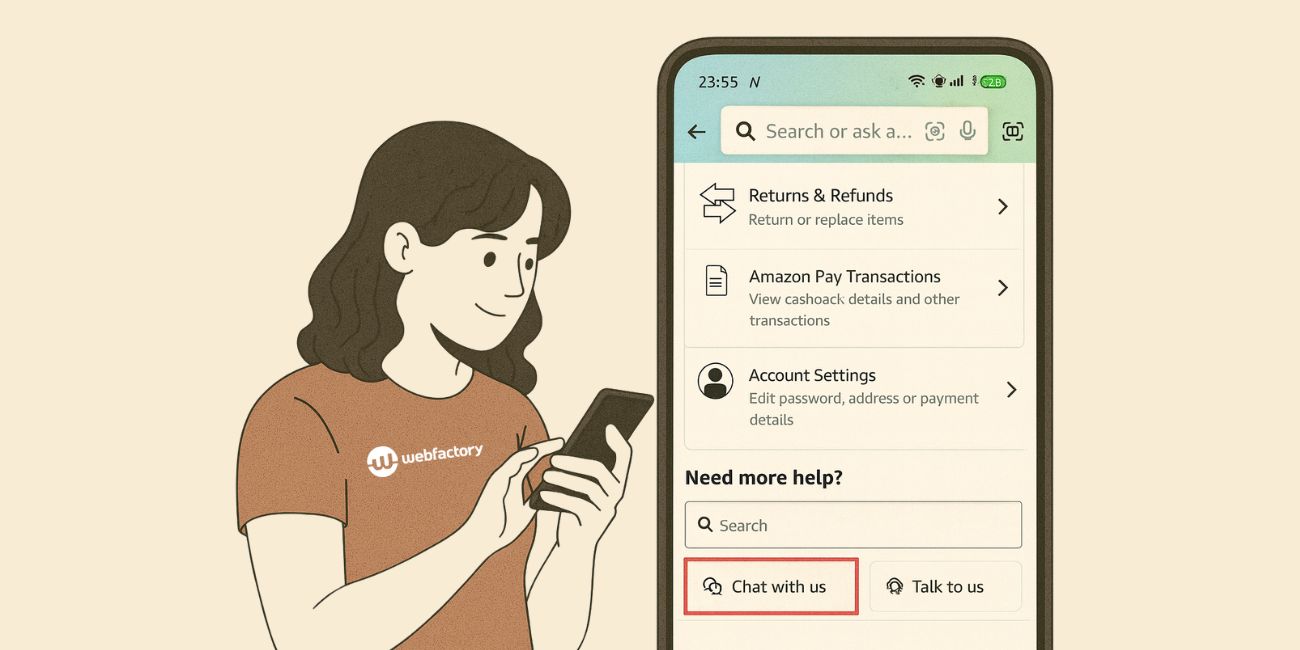
The app gives you the fastest path to live help. Follow these steps:
- Open the Amazon app on your phone.
- Tap the profile icon or the three-line menu.
- Tap Customer Service.
- Pick the order you need help with.
- Scroll until you see the contact options.
Once you select the order, Amazon chooses the most relevant help tools, such as chat, callback, or self-service buttons. The app usually offers more options than the desktop website, especially for refunds and replacements.
Use Amazon Live Chat
Amazon’s live chat is the simplest way to reach a real person. Many users prefer it because it moves faster than phone support and does not require waiting on hold. When you open chat, the system loads your order history so the agent sees everything right away.
Chat works best for:
- refund requests
- replacement items
- issues with Prime benefits
- questions about digital purchases
- help with payment methods
Most chat sessions begin with a bot, but a real agent joins once you type your issue clearly.
Get a Phone Call From Amazon

Amazon no longer displays a direct phone number. Instead, you request a callback. This method connects you with an agent quickly, and they walk you through the issue step by step.
Here’s how it works:
- Open the Help Center → Choose your order or problem → Tap Phone or Call me → Enter your number → Wait for the call.
Callback wait times vary, but in many cases, the call comes within a few minutes. If you miss the first call, you can request another one. Phone support works well for complex problems, such as account access issues or repeated delivery failures.
Help for Orders, Refunds, and Missing Packages
Amazon builds automatic tools for the most common problems. These tools often solve the problem before you even contact an agent.
A missing package can be reported with a simple button. If it shows “Delivered” but you never received it, the app may offer a refund or replacement right away.
If you received the wrong item, you can send a photo and choose “Replace or refund.” For damaged items, most products qualify for an instant refund without returning them.
Third-party sellers are covered under the A to Z Guarantee, which protects you when sellers do not respond or send faulty items. Amazon steps in and resolves the issue for you once the claim is approved.
Contact Amazon Without Logging In
If you cannot access your account, Amazon still provides limited help. These tools are harder to find, but they exist.
You can reach the guest help page, which gives basic answers about returns and delivery. You can check tracking directly with UPS, USPS, or FedEx if you know the tracking number. You can also use the password reset tools to regain access, and in some cases, you can request a callback after verifying limited personal information.
These methods do not provide full support, but they can help if you are temporarily locked out.
Common Problems and Easy Fixes
Some users get stuck while trying to reach a real person. Here are simple fixes:
- Chat keeps looping
Close the app completely, reopen it, and select the order again. - Callback option not showing
Tap “Other issues” or pick a different help topic. - Wrong account loaded
Sign out, then sign in using the email linked to your order. - Device issues are getting ignored.
Choose Devices in the Help Center if you need help with Kindle, Fire TV, or Alexa.
Small menu choices often make a big difference.
When to Escalate the Issue
If your problem is not solved, you can escalate it. Ask the agent for a supervisor, or request a separate review. When dealing with a third-party seller who refuses to cooperate, open an A-to-Z Guarantee claim. For billing issues that Amazon cannot fix, your bank can help you dispute the charge.
Escalation is rare, but helpful when the basic support path does not solve the problem.
Final Notes
Amazon offers many ways to reach customer service, but the options are tucked away in layered menus. Once you know where to tap and what each tool does, getting help becomes easy. If you found a faster method or solved a tricky problem, share your tips so others can follow the same path.

