

Quick Answer: The green Following button on Instagram usually means you’re connected to that person through Instagram’s Close Friends feature. Most of the time, it means they’ve added you to their Close Friends list, so you may see private Stories or posts they don’t share with everyone.
You open someone’s Instagram profile, and instead of seeing the normal Following button, it looks green. Maybe you also saw a green circle around their Story. It feels a little hidden, and to be honest, Instagram doesn’t always explain these small signs very clearly.
The simple answer is that green on Instagram is often linked to Close Friends. This is Instagram’s private sharing feature. It lets someone share certain Stories, posts, or updates with a smaller group instead of all their followers. So if you see green Following on Instagram, it’s usually not a random color change. It means something about the way that person is sharing content with you.
Still, this is where it gets a bit tricky. A green Following button, a green Story ring, and a green active dot are not all the same thing.
What Does Green Following Mean on Instagram?
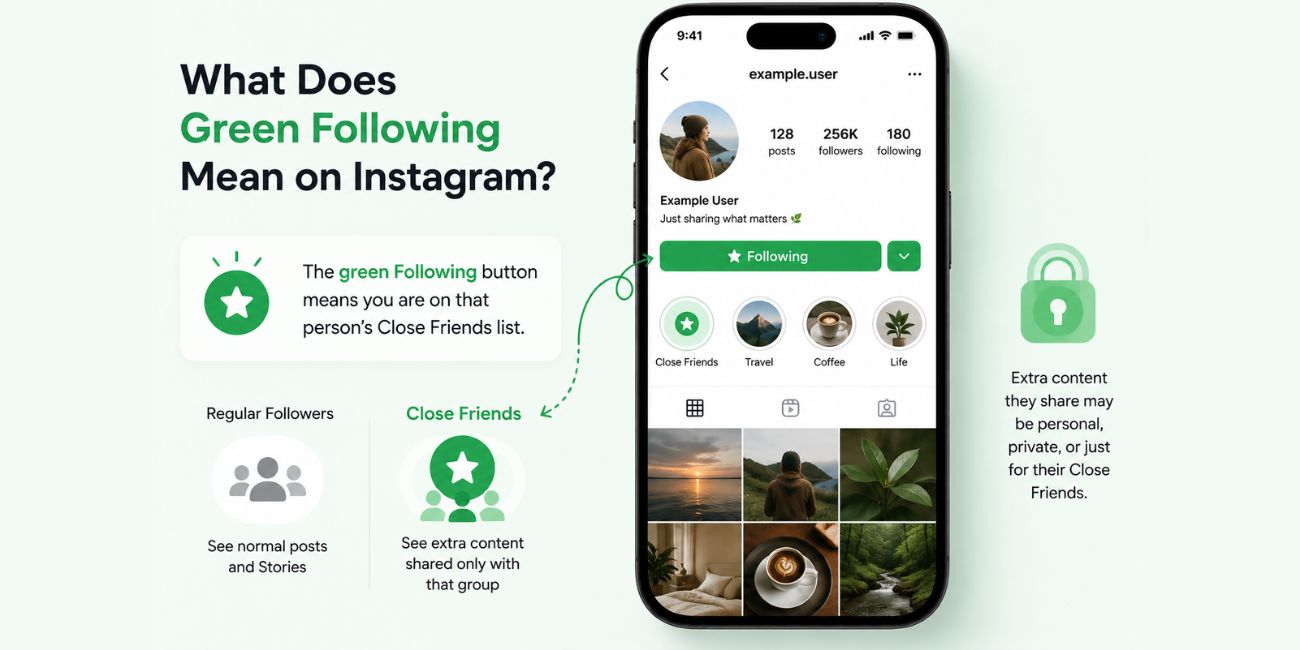
The green Following button on Instagram usually means you are on that person’s Close Friends list. In plain words, they’ve chosen you as part of a smaller group that can see more private content.
This doesn’t mean they are your best friend in real life. It doesn’t mean they have a crush on you. It also doesn’t mean they follow you back. It only means they may have added your account to their Close Friends audience.
A simple way to think about it is this: regular followers may see normal posts and Stories, but Close Friends can see extra content that the person shares only with that group. That content may be personal updates, casual photos, private Stories, behind-the-scenes posts, or anything they don’t want to show everyone.
It’s just a sharing setting. Nothing magical.
If the green Following button appears on someone’s profile, it’s a sign that Instagram may be showing your connection to their Close Friends feature. If it disappears later, that may mean they removed you, changed their list, posted normal content instead, or Instagram changed how the button looks on your app.
Green Following vs Green Circle vs Green Active Dot
Instagram uses green in more than one place, which is why people get confused. Look, it’s not your fault. The app gives tiny signals and expects everyone to understand them.
| Green Indicator | Where You See It | What It Usually Means |
|---|---|---|
| Green Following button | On someone’s profile | You may be on their Close Friends list |
| Green circle around Story | Around their profile photo in Stories | They posted a Close Friends Story you can view |
| Green active dot | Near their profile photo in messages or activity areas | They may be active on Instagram |
The green circle is the easiest one to understand. If you see a green ring around someone’s Instagram Story, that usually means the Story was shared with Close Friends, and you’re included in that audience.
The green active dot is different. That one is about Activity Status. It can show when someone is online or was recently active, depending on their privacy settings. It has nothing to do with Close Friends.
So don’t mix them up. Green doesn’t always mean the same thing.
How Close Friends Works on Instagram
Close Friends is a private list that a user controls from their own Instagram account. They can add people, remove people, and share certain content only with that list. The people on the list don’t get a big alert saying, “You’ve been added.” Instagram keeps it quiet.
Here’s what usually happens:
- Someone goes to their Instagram profile settings and opens Close Friends. This is where they manage the list. They can search for people and choose who they want to include.
- They add selected followers to the list. This matters because only people on that list can see content shared to Close Friends. It’s not the same as a normal public Story.
- They post a Story, post, or other content to Close Friends. When they choose the Close Friends option, Instagram limits the audience to only those friends. Regular followers won’t see that private version.
- People on the list may see green signs. That could be a green Story ring, a Close Friends label, or in some cases a green Following button on the profile.
The person who owns the list is the only one who can fully see and manage it. You can’t open a page that shows every person who added you to Close Friends. Instagram doesn’t give users that kind of list.
That part matters a lot, because many people search this topic hoping they can check who added them. You can only notice signs, like the green circle or green Following button. You can’t view someone else’s full Close Friends list.
Why the Green Following Button May Disappear
If the green Following button was there before and now it’s gone, don’t panic. It doesn’t always mean something personal happened.
The most common reason is that the person changed their Close Friends list. They may have removed you, cleaned up the list, or made it smaller. People do that all the time, sometimes without thinking too much about it.
It could also be an Instagram app issue. The app changes layouts, tests small design updates, and sometimes shows features differently across accounts. One person may see a green button, while another person sees a normal Following button on the same kind of profile.
Another reason is simple: you may have been looking at a different green sign. Maybe it was the green Story circle, not the Following button. Maybe it was the active dot. These details look small on a phone screen, so it’s easy to mix them up.
Also, if someone stops posting Close Friends content for a while, you may not see many green signs from their account. That doesn’t always prove you were removed. It may just mean they haven’t shared anything private recently.
Common Mistakes People Make About Green Following
A lot of wrong ideas float around about this feature. Some sound believable, but they’re not quite right.
One common mistake is thinking the green Following button means the person followed you back. It doesn’t. The normal Following button only means you follow them. Whether they follow you back is a different thing.
Another mistake is thinking everyone can see that green button. Usually, these Close Friends signs are personal to the viewer. If you see a green Story ring, it’s because you are allowed to see that Close Friends Story. Other followers may not see it at all.
Some people also think green Following means they’re ranked higher than other followers. Not really. Instagram doesn’t say that. It just means the person chose to include you in a private audience. That choice could be personal, casual, business-related, or even temporary.
And one more thing: being added to Close Friends doesn’t mean you’ll stay there forever. Someone can remove you anytime. No big announcement.
FAQs About Green Following on Instagram
Does green Following mean I’m on someone’s Close Friends list?
Most of the time, yes. A green Following button is usually connected to Instagram’s Close Friends feature. It can mean that person added you to their Close Friends audience.
Is green Following the same as the green active dot?
No. The green active dot is about Activity Status. It may show that someone is online or recently active. Green Following is usually linked to Close Friends.
Can someone tell if I added them to Close Friends?
Instagram usually doesn’t send a notification when you add someone. But they may notice signs, like a green Story ring or a green Following button, when they view your content or profile.
Why did someone’s green Following button disappear?
They may have removed you from Close Friends, changed their list, or Instagram may be showing the interface differently. It could also be a simple app display change.
Can I remove myself from someone’s Close Friends list?
Not directly. You can’t manage another person’s Close Friends list. If you don’t want to see their Stories, you can mute their Stories or unfollow them.
Final Thoughts
Green Following on Instagram usually points to the Close Friends feature. It means you may be part of a smaller audience that can see private Stories, posts, or other shared content. But don’t read too much into it. It doesn’t always mean something deep, and it’s not the same as the green active dot.
The main thing to remember is simple: green on a Story usually means Close Friends, green near activity usually means online status, and green Following usually connects to Close Friends access.
Have you seen a green Following button on someone’s Instagram profile, or was it a green circle around their Story? Comment which one you noticed.

